Self-Leveling Laser Level: Remote Control, 5H Runtime
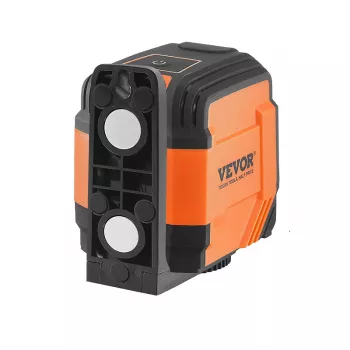
Self-Leveling Laser Level with Remote Control and 5H Continuous Working Time
A self-leveling laser level helps keep layout lines straight and consistent for jobs like hanging shelves, aligning tiles, setting cabinets, or marking wall fixtures. This model adds remote control convenience and up to 5 hours of continuous working time, making it easier to keep a project moving without constant repositioning or manual adjustments.
What It Does (and When It Helps Most)
Laser levels turn “close enough” into clean, repeatable alignment. They’re especially helpful when the human eye will notice even a slight drift across a long run.
- Projects where small alignment errors become obvious: tile courses, backsplash rows, picture walls, trim lines, and cabinet runs.
- Tasks that benefit from a consistent reference line across a room: leveling multiple mounting points, chair rails, and curtain hardware.
- Jobs that are faster with hands-free operation: turning the beam on/off or switching modes without walking back to the tool.
Core Features at a Glance
- Self-leveling capability to reduce setup time and minimize manual leveling steps.
- Remote control for mode changes and operation from a distance, useful when working across the room or on a ladder.
- Up to 5 hours of continuous working time to support longer sessions without frequent charging or battery swaps.
- Designed for common indoor layout tasks where clear, stable reference lines improve accuracy and speed.
Self-Leveling: How It Improves Accuracy
Self-leveling takes a lot of guesswork out of indoor layout. Instead of chasing a bubble vial and re-checking after every small bump, the tool compensates for minor tilt so the projected line stays consistent.
- Automatically compensates for small surface or tripod imperfections so the projected line stays level within the self-leveling range.
- Reduces human error from reading bubble vials or rechecking multiple times after moving the tool.
- Helps maintain consistency when repositioning: set up, let it settle, confirm the line, then mark multiple points quickly.
Remote Control: Practical Advantages on Real Jobs
Remote operation is one of those features that feels optional—until it saves several trips across the room or a few extra ladder climbs. When you can switch modes or toggle the beam without touching the tool, the line stays where you set it.
- Saves time when the tool is placed in a hard-to-reach spot (behind furniture, on a high tripod, or near the center of a room).
- Useful for solo work: adjust settings while staying at the work surface to confirm the line’s placement.
- Helps maintain workflow on ladder tasks by reducing climbs just to toggle power or change a mode.
5-Hour Continuous Working Time: Planning Your Session
Longer runtime supports uninterrupted layout—particularly when you’re establishing reference lines first and installing second. Keeping the beam active for extended stretches can help prevent “reset” mistakes that happen when you stop mid-process.
- Supports extended layout work like multi-wall shelving, long tile runs, or whole-room picture rail alignment.
- Helps avoid interruptions that can introduce rework (stopping mid-layout, losing reference points, or re-establishing benchmarks).
- Best practice: start with a fully charged battery/installed fresh batteries, and keep the tool protected from accidental bumps during long runs.
Typical Setup Steps for Clean, Repeatable Lines
A laser line is only as reliable as its setup. A few simple habits help you get repeatable results, especially when you have to move the tool to cover multiple walls.
Where It Fits: Common Use Cases
Quick Comparison: What to Look For in This Tool Class
Feature Checklist for Self-Leveling Laser Levels with Remote Operation
| Feature | Why it matters | What to check |
|---|---|---|
| Self-leveling | Keeps reference lines level without manual trial-and-error | Leveling range, settling behavior, and stability on the chosen mount |
| Remote control | Reduces walking back and forth and improves ladder safety | Operating distance, responsiveness, and the functions the remote can control |
| Continuous working time | Supports longer layout sessions without re-establishing references | Rated runtime (e.g., 5 hours) and real-world impact of brightness/mode |
| Mounting options | Affects stability and placement flexibility | Tripod compatibility, wall mount options, and secure attachment points |
| Jobsite handling | Maintains accuracy if bumped or moved | How easily it can be re-checked and re-established after repositioning |
Care, Storage, and Laser Safety Basics
Good handling keeps lines crisp and helps preserve accuracy over time. For workplace-style laser guidance, review established safety references such as OSHA’s laser hazards overview and CCOHS laser safety guidance. For broader standardization context, see the IEC site for information related to IEC 60825.
Product Page
Check current price, stock status, and images on the Self-Leveling Laser Level with Remote Control and 5H Continuous Working Time product page before purchase. Confirm what’s included (tool, remote, mounts, charging cable/batteries) based on the listing details at checkout.
More In-Stock Picks
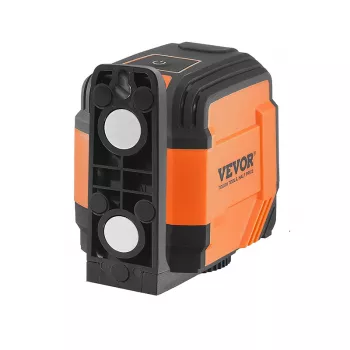
- Self-Leveling Laser Level with Remote Control and 5H Continuous Working Time
- Kids Wooden Tool Bench Set
- Personalized Balloon Letter Necklace
FAQ
How does self-leveling work on a laser level?
Self-leveling uses an internal mechanism to compensate for small tilts within a limited range, keeping the projected line level without manual tweaks. If the tool is outside that range, it typically signals out-of-level and needs to be repositioned or adjusted.
Is a remote control useful for indoor projects?
Yes—remote control helps you change modes or toggle the beam while staying at the work area, which is especially useful when working solo. It also reduces ladder climbs and helps keep the tool undisturbed after you’ve dialed in the line.
What does 5 hours of continuous working time mean in practice?
It’s an estimated runtime under typical operating conditions, and real-world results can vary based on mode selection, brightness, and battery condition. For the most predictable session, start with a full charge or fresh batteries and avoid unnecessary power cycling mid-layout.










Leave a comment