Voice-Activated Digital Recorder: Cleaner Audio, Less Silence
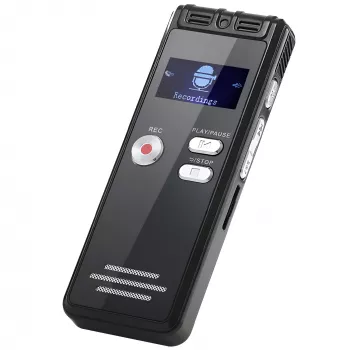
Digital Voice Recorder with Voice Activation & Noise Reduction
Capturing clear audio in real-world settings often means dealing with background chatter, HVAC hum, and pauses between important moments. A compact recorder with voice activation and noise reduction helps preserve what matters—meetings, lectures, interviews, reminders—while keeping files organized and easier to review. Instead of ending up with a two-hour file full of silence and room noise, you get tighter recordings that are simpler to replay, search through, and archive.
What voice activation changes in everyday recording
Voice activation (sometimes called VOR) is a practical feature that makes long recordings far more manageable. Rather than recording continuously, the device listens for speech and starts when it detects sound above a set threshold.
- Starts recording when speech is detected and pauses during silence to reduce dead air.
- Helps conserve storage space by avoiding long stretches of quiet.
- Makes playback and note-taking faster by focusing on spoken segments.
- Useful for lectures, brainstorm sessions, personal memos, and hands-free capture.
For day-to-day use, the biggest advantage is review speed. When the recording naturally skips long pauses, it’s easier to catch key points without constantly fast-forwarding. It can also reduce battery drain over long sessions because the recorder isn’t writing audio data continuously.
Noise reduction: what it can (and can’t) fix
Noise reduction is designed to improve intelligibility, not create studio-grade sound. In most compact recorders, it works best on steady, predictable noise—think fans, air conditioners, and low background hum—so the voice stands out more clearly.
- Reduces steady background noise (fans, air conditioners, distant hum) to improve speech clarity.
- Works best when the speaker is relatively close and speaking consistently.
- May not fully remove sudden sounds (door slams, keyboard clicks) or heavy crowd noise.
- Positioning matters: place the recorder closer to the speaker and away from noise sources when possible.
Common scenarios and practical setup tips
| Scenario | What helps most | Quick setup tip |
|---|---|---|
| Lecture hall | Voice activation + closer placement | Set the recorder near the podium or front row to prioritize direct speech |
| Team meeting | Noise reduction + stable placement | Place it centered on the table and avoid touching it during recording |
| Interview | Consistent mic distance | Keep a consistent distance from the speaker and reduce room echo (soft furnishings help) |
| Personal reminders | Voice activation | Enable voice activation to capture only when speaking and keep files shorter |
Features to look for before buying
Even if two recorders look similar, small usability details can make a big difference when you’re trying to capture something quickly and reliably.
- Microphone sensitivity options: Higher sensitivity can help with quieter speakers, while lower sensitivity can reduce accidental triggers in noisy rooms.
- Simple controls: Straightforward start/stop reduces fumbles, especially when you’re trying to be discreet in a meeting or classroom.
- File formats and transfer: Make sure the files are easy to move to a computer for long-term storage and sharing.
- Battery/charging fit: Short daily memos vs. all-day sessions may call for different charging habits.
- Clear recording indicators: A visible status cue helps prevent the frustrating “it wasn’t recording” moment.
Also consider how you’ll organize recordings after the fact. A recorder that makes it easy to keep sessions separated can save time later—especially for students or professionals who build a library of audio over weeks or months.
Best use cases
- Students: Record lectures and study sessions, then replay key explanations while reviewing notes.
- Professionals: Capture meeting notes and action items when typing isn’t practical.
- Creators and researchers: Collect interview audio and field notes on the go.
- Home organization: Store quick reminders, to-dos, and shopping lists as voice memos.
Voice activation is especially helpful for lectures and brainstorming sessions where there are frequent pauses, while noise reduction tends to shine in offices or classrooms with constant HVAC noise.
Quick start: getting cleaner audio in minutes
Product spotlight: Digital Voice Recorder with Voice Activation & Noise Reduction
If you want a straightforward, budget-friendly recorder built around the two features that most improve day-to-day usability, the Digital Voice Recorder with Voice Activation & Noise Reduction is designed for practical capture in classrooms, meetings, and general voice memo routines. Voice activation helps reduce silent gaps, while noise reduction can improve intelligibility in typical indoor environments where low-level background sound is unavoidable.
For workspace setup and small fixes—like adjusting a stand, tightening hardware on a desk accessory, or keeping essentials together—the 96 Piece Household Tool Kit can be a handy add-on for home offices and study areas.
Care, storage, and privacy basics
For a deeper look at U.S. federal law and general guidance on consent, see the U.S. Department of Justice overview related to the Wiretap Act (18 U.S.C. § 2511) and Nolo’s plain-language explainer on recording conversations and meetings.
FAQ
Does voice activation miss quiet speakers?
It can if sensitivity is set too low or the recorder is too far away. Do a short test, increase sensitivity if available, and move the recorder closer to the speaker while reducing competing background noise.
Will noise reduction remove all background sounds?
No—noise reduction typically lowers steady sounds like hum and fan noise, but it won’t fully eliminate sudden, sharp noises or loud crowd chatter. The best results come from good placement and minimizing echo in the room.
Is it legal to record conversations?
It depends on where you are and the situation, since consent laws vary (for example, one-party vs. all-party consent). When in doubt, get permission and follow any workplace or school policies that apply.










Leave a comment